Assignment 1, CSC232, Winter 2026
1 Acknowledgments
This assignment was developed by Milda Zizyte, Kathi Fisler, Shriram Krishnamurthi, and possibly others. Thank you!
2 Team
You should do this assignment with the partner you were assigned for Lab 1.
3 What we care about
What we will look for when grading:
We want accuracy in the shapes that are present, their general locations, sizes, and orientations.
We do not care about exact positioning, size ratios, borders, or angles.
We do not care about specific color shades. For example, you can use "green" even though it produces a much brighter green than on some of these flags. If you want to be accurate, a comprehensive list of color names can be found here.
We will NOT be grading for style on this assignment. (In fact, most of the style guide won’t even make sense until the middle of next week.)
4 Learning outcomes:
Navigating Pyret documentation,
Working with Pyret image operators to compose expressions, and
Practicing program planning.
5 Part One: Flags
This assignment is about flags!
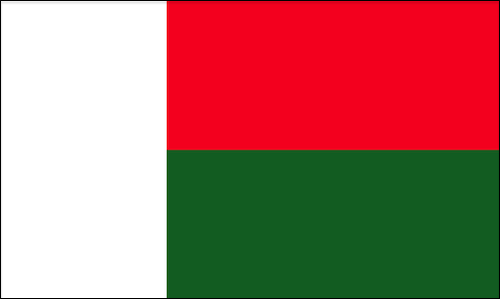
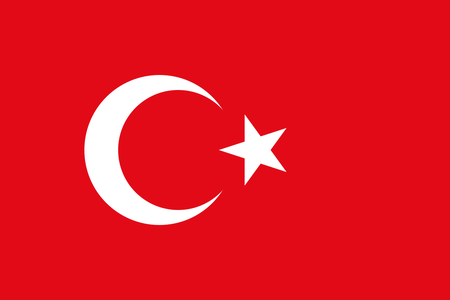
In the first part, you will be generating four different flags:
The flag of Madagascar:
The flag of Turkey:
The flag of Saint Lucia:

The flag of Greenland:

Make sure to use the solid color white to fill shapes where appropriate. Do not depend on the Pyret website’s background to fill in white areas of your image.
Reminder: Set up your code so that the four flags are output on the right hand side when we press the run button. Make sure nothing else is output (no sub-images, numbers, strings, or otherwise)
6 Part Two: Program Planning
Most of the time, producing successful code requires thorough outlining and planning. Program planning is a skill that can help you deconstruct a problem in a way that allows you to avoid potential bugs. We now want to practice the process of outlining code prior to coding.
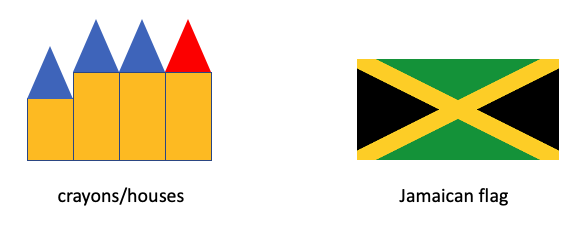
Pick one of the two images below. Without coding it, write a list of steps and action items that describe, in words, how to recreate your image (imagine that you were trying to get a child to draw the image from your steps) starting from basic shapes. Use any terms you want to describe the steps: you don’t have to stick to names of operations that exist in Pyret or concepts that we’ve covered in class.
Write your instructions in a word processor or text editor of your choice (Word, Google Docs, etc), then save/export the file as a PDF (we’re practicing this workflow now since we will need to do this multiple times this semester). Remember you’re writing these steps in prose, not code.
7 Handing in your assignment
Download your Pyret file (File > Download) and make sure it is called hw1-code.arr for Part One.
Create a file titled program-steps.pdf that only contains your written action items from part Two.
Hand in your work on Gradescope, using the "Assginment 1: Flags" label.
Be sure to add your teammate to your team after your submission. (Every time you submit!)
You may submit as many times as you want before the deadline. Only your latest submission will be graded.
If you have any questions, please post on Edstem. Don’t post any code unless requested by TAs, though.